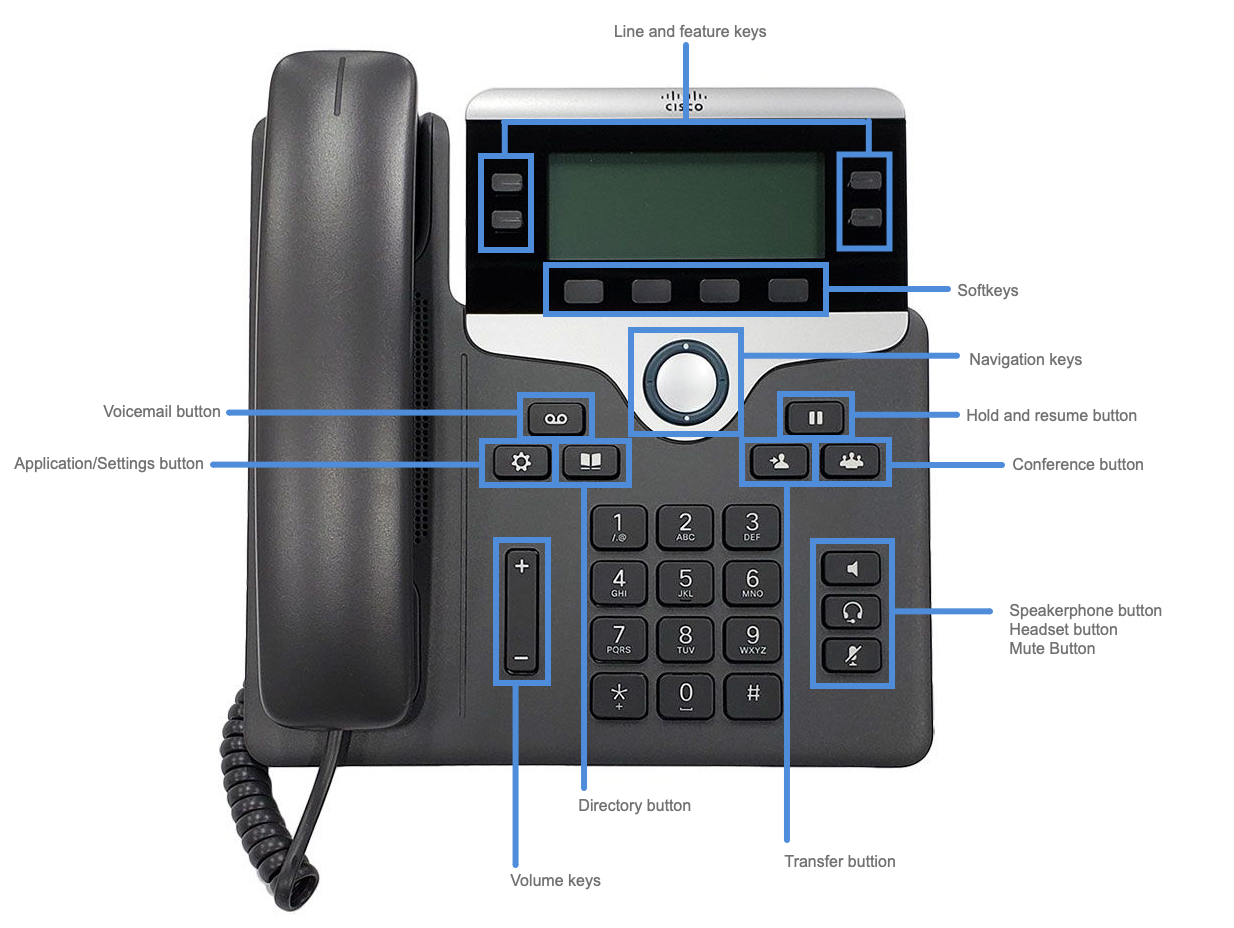
HamPY-yhteensopivat asetukset Cisco 7841 IP-puhelimille, jotka on päivitetty 3rd party call control (3PCC) SIP-firmwarelle.
Asetukset lyhyesti
System -> Security Settings -> FIPS Mode: Disabled
System -> Security Settings -> TLS Cipher List: DEFAULT
System -> Network Settings -> IP Mode: IPv4 Only
System -> Optional Network Configuration -> Primary NTP Server: fi.pool.ntp.org
Provisioning -> Firmware Upgrade -> Transition Authorization Rule: http://voip.oh2th.fi/lic/$MAU.licRegional -> Time -> Time Zone: GMT+02:00
Regional -> Time -> Daylight Saving Time Rule: start=3/-1/7/3;end=10/-1/7/4;save=1
Regional -> Language -> Locale: fi-FIPhone -> General -> Station Display Name: HamPY xxxxx
Phone -> Line Key 1 -> Short Name: HamPY $USER
Phone -> Line Key 2 -> Short Name: HamPY $USER
Phone -> Line Key 3 -> Short Name: HamPY $USER
Phone -> Line Key 4 -> Short Name: HamPY $USER
Phone -> XML Service -> XML Directory Service Name: HamPY Puhelinluettelo
Phone -> XML Service -> XML Directory Service URL: http://voip.oh2th.fi/directory.xmlExt N -> General -> Line Enable: Yes / No
Ext N -> Proxy and Registration -> Proxy: haloo.oh2ch.fi
Ext N -> Subscriber Information -> Display Name: HamPY nnnnn
Ext N -> Subscriber Information -> User ID: nnnnn
Ext N -> Subscriber Information -> Auth ID: nnnnn
Ext N -> Subscriber Information -> Password: *
Ext N -> Dial Plan -> Dial Plan: (*xx|059S0|xxxxx|73xxxxxxS0|73xxxxxxxS0)Att Console -> General -> Server Type: Asterisk
Firmware lisenssi
Nämä puhelimet saa helpoimmalla kiinni Asterisk-pohjaisiin puhelinvaihteisiin päivittämällä niiden softa puhtaaksi SIP-puhelimeksi. Ohjeet tämän tekemiseksi löytyy Ciscon päivitysportaalista. Päivittäminen vaatii maksullisen päivityslisenssin.
Itse hoidin tämän DHCP:n avulla omassa VLAN:ssa ja asettamalla vaaditut DHCP-optiot:
Cisco: Bulk migration with DHCP (Phone’s staging facility)
- Configure the DHCP Option 150 to 3.14.211.49; or alternatively, if the DHCP Option 150 is not used, configure the DHCP Option 66 to cloudupgrader.webex.com
- Configure the DHCP Option 160 to https://cloudupgrader.webex.com/Cisco/GDS/$PN/$MA.cfg
- You may need to reboot the phones to pick up the DHCP configuration.
- Wait for the phones to download the config and upgrade/restart several times.
- As soon as the migration process is completed, each phone will prompt for an activation code.
Kun puhelin käynnistetään DHCP-verkossa edellä olevin parametrein, päivittyy puhelin automaattisesti.
Jotta puhelin saa lisenssitiedoston, pitää lisenssin rekisteroidä puhelimen MAC-osoitteen perusteella Ciscon lisenssin portaalissa tilatun PAK-tiedoston avulla. PAK-tiedostossa voi olla tilaus usealle puhelimelle sen mukaan mitä on tilattu. Ole tarkkana MAC-osoitteen kanssa, että se tulee kerralla oikein.
Lisenssintiedoston saamiseksi puhelimeen tulee sen asetuksissa vaihtaa Transition Authorization Rule asetus. Esimerkiksi:
Provisioning -> Firmware Upgrade -> Transition Authorization Rule: http://voip.oh2th.fi/lic/$MAU.licTässä $MAU on puhelin MAC-osoite. Alkuperäinen arvo on https://cloudupgrader.webex.com/licenses/e2m/$MAU.lic.
Kun asetukset talletaan, boottaa puhelin ja saa haettua lisenssitiedoston.
Dialplan
Puhtaassa HamPy-verkossa riittää dialplaniksi, eli sallitujen puhelinnumeroiden määritelmäksi (*xx|059S0|xxxxx|73xxxxxxS0|73xxxxxxxS0) kun alkuperäinen oli (*xx|[3469]11|0|00|[2-9]xxxxxx|1xxx[2-9]xxxxxxS0|xxxxxxxxxxxx.).
Puhelinluettelo
HamPY-puhelinluetteloa varten asetetaan XML Directory Service.
Phone -> XML Service -> XML Directory Service Name: HamPY Puhelinluettelo
Phone -> XML Service -> XML Directory Service URL: http://voip.oh2th.fi/directory.xmlAjan ja päiväyksen esitysmuoto
Toistaiseksi en ole löytänyt miten näytöllä olevan ajan ja päiväyksen esitysmuodon saa muuten muutettua kuin puhelimen näppäimistön kautta menemällä asetuksiin painamalla Application/Settings button.
Device Admistration -> Date/Time -> Time Format: 24h
Device Admistration -> Date/Time -> Date Format: day/month
Valintojen jälkeen paine SET -toiminnenäppäintä ennen valikosta poistumista.
Muuta
Cisco IP Phone 7800 Series Multiplatform Phones Administration Guide
XML Reference Guide for Cisco IP Phone Multiplatform Phones
Download config from phone: http://ipaddress/admin/cfg.xml